

The QFIL Tool v2.0.0.9, also known as the Qualcomm Flash Image Loader, is a Windows-based application designed to flash or install stock firmware or recovery images onto devices powered by Qualcomm. It supports a wide range of Qualcomm devices, including smartphones, tablets, and modems.
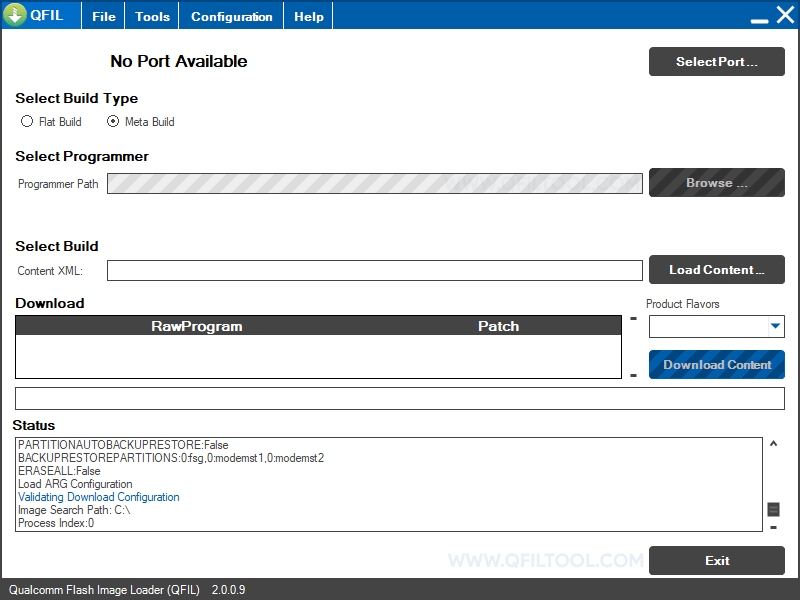
QFIL Tool v2.0.0.9 for Windows
QFIL Tool v2.0.0.9 is primarily used to flash stock or custom firmware images onto Qualcomm devices, particularly when the device is bricked or needs to be restored to its original state. This is particularly beneficial when over-the-air (OTA) updates are not feasible or when the device fails to boot properly.
Some of the Key features of the QFIL Tool include:
- Unbricking Devices: If a Qualcomm-powered device gets bricked (often due to software errors, failed updates, or flawed custom ROM installations), QFIL can be used to restore it to working condition.
- Flashing Stock Firmware: QFIL is primarily used to flash official Firmware onto Qualcomm devices. This can be useful for upgrading, downgrading, or reinstalling the device’s operating system.
- Log Box: QFIL provides a dedicated log box that shows ongoing processes and tasks in real time, helping users better monitor and understand the flashing process.
- Loader Package: QFIL includes a built-in loader package, which can be beneficial if the user doesn't have one.
- Support for Qualcomm Chipsets: As a tool designed explicitly for Qualcomm devices, it offers broad support for many devices running these chipsets.
- Multiple Download Types: Users can select different download types, such as “Flat Build” or “Meta Build”, based on their needs.
Download QFIL Tool v2.0.0.9
| Name | QFIL Tool v2.0.0.9 |
| Type | Flash Tool for Qualcomm Devices |
| Developer | Qualcomm Technologies, Inc |
| File Name | Qualcomm_Flash_Image_Loader_v2.0.0.9.zip |
| File Size | 2.92 MB |
| Version | 2.0.0.9 |
| Supports | Microsoft Windows (32-bit and 64-bit) |
Frequently Asked Questions
What is QFIL Tool v2.0.0.9?
QFIL (Qualcomm Flash Image Loader) is a flash tool developed for devices powered by Qualcomm chipsets. It’s part of the larger QPST (Qualcomm Product Support Tools) suite.
How do I install the QFIL Tool v2.0.0.9?
The QFIL Tool v2.0.0.9 is portable, so there’s no need to install it on your computer. Download the Flash Tool, extract its contents, and run the QFIL.exe file to start the program.
How to use the QFIL Tool v2.0.0.9?
First, boot the device into Fastboot mode. Then, connect the device to the computer and launch the QFIL Tool. Next, load the Firmware into the Flash tool, then click the Flash button to begin flashing. Alternatively, you can follow the instructions on How to use QFIL Tool to install Firmware.
Is QFIL Tool v2.0.0.9 Free?
The QFIL Tool v2.0.0.9 is indeed free to use, as it is an official release from the Qualcomm community, designed specifically for Qualcomm mobile users.
Is QFIL Tool v2.0.0.9 Safe?
Indeed, the QFIL Tool v2.0.0.9 is safe to use on computers, laptops, and Qualcomm mobiles. Additionally, since Qualcomm officially releases the tool, it ensures utmost safety and security when used on your computer.
Where Can I find Qualcomm Firmware?
If you are looking for the original Firmware (Stock ROM) compatible with QFIL Tool, then head over to the Qualcomm Firmware page.
